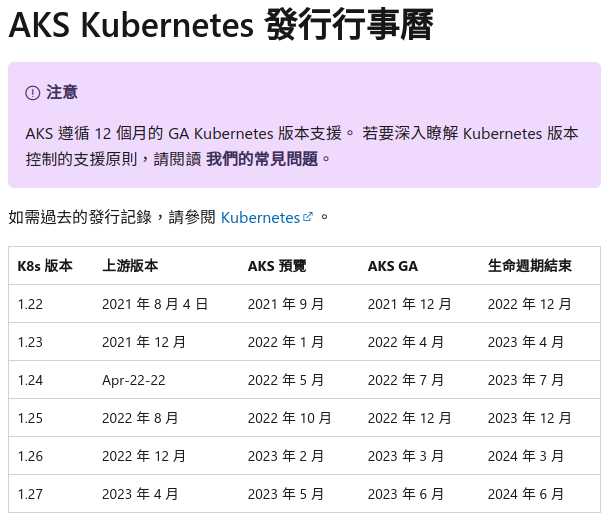
OS: container with openSUSE Leap 15.4
上次升級是 2022/10 , 這次會來升級的原因是
因應 GKE, 安裝 gke-gcloud-auth-plugin 與 kubectl
Azure 再官方文件上面宣告 2.39.0 之後就不支援 openSUSE / SUSE, 請使用者用其他的 OS 版本 - 故移除 azure cli 與 azure ansible module
更新 gcloud 以及 AWS Cli 版本
同步紀錄一下目前 Azure CloudShell 上面的 Ansible 資訊
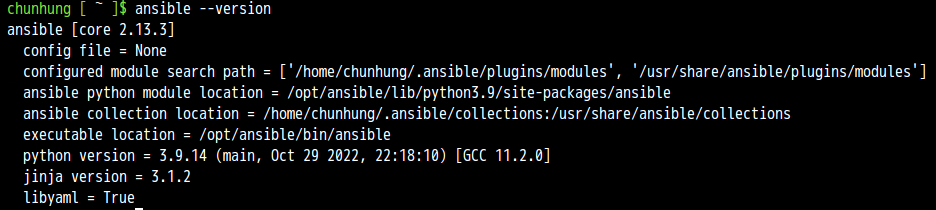
先整理結果
升級前
OS: openSUSE Leap 15.4
awscli: aws-cli/2.8.5 Python/3.9.11
gcloud: Google Cloud SDK 406.0.0
azure-cli: 2.35.0 (目前有 bug)
ansible: 2.11.12
升級後
OS: openSUSE Leap 15.4
awscli: aws-cli/2.9.12 Python/3.9.11
gcloud: Google Cloud SDK 412.0.0
ansible: 2.11.12
GCP Cloud SDK 版本
AWS CLI v2 安裝文件
另外執行 ansible --version 也會收到之後 ansible 需要 python 3.8 以上的告警, 訊息如下
[DEPRECATION WARNING]: Ansible will require Python 3.8 or newer on the controller starting with Ansible 2.12. Current version: 3.6.15 (default, Sep 23
2021, 15:41:43) [GCC]. This feature will be removed from ansible-core in
version 2.12. Deprecation warnings can be disabled by setting
deprecation_warnings=False in ansible.cfg.
這次的做法還是會透過 docker build 指令來進行
Dockerfile 的部分我是拿之前的 Dockerfile 來修改目前是 openSUSE Leap 15.4
修改細節
Update time
移除 Azure CLI 安裝以及 Ansible Azure module
Google SDK 版本還有下載的檔案路徑以及檔案名稱
安裝 kubectl 以及需要的 components
列出 diff 的結果給大家參考
> diff opensuseLeap153_ansible_20221022_Dockerfile opensuseLeap154_ansible_20230102_Dockerfile
< # update time: 20221022
---
> # update time: 20230102
45,48c45,50
< RUN zypper install -y curl && \
< rpm --import https://packages.microsoft.com/keys/microsoft.asc && \
< zypper addrepo --name 'Azure CLI' --check https://packages.microsoft.com/yumrepos/azure-cli azure-cli && \
< zypper install --from azure-cli -y azure-cli
---
> # 2023/1/2 Azure 宣告不支援openSUSE/SUSE, 所以不進行安裝 - https://learn.microsoft.com/en-us/cli/azure/install-azure-cli-linux?pivots=zypper
> #
> #RUN zypper install -y curl && \
> # rpm --import https://packages.microsoft.com/keys/microsoft.asc && \
> # zypper addrepo --name 'Azure CLI' --check https://packages.microsoft.com/yumrepos/azure-cli azure-cli && \
> # zypper install --from azure-cli -y azure-cli
52,56c54,58
< RUN zypper install -y curl && \
< curl -O https://raw.githubusercontent.com/ansible-collections/azure/dev/requirements-azure.txt && \
< pip3 install -r requirements-azure.txt && \
< rm -f requirements-azure.txt && \
< ansible-galaxy collection install azure.azcollection
---
> #RUN zypper install -y curl && \
> # curl -O https://raw.githubusercontent.com/ansible-collections/azure/dev/requirements-azure.txt && \
> # pip3 install -r requirements-azure.txt && \
> # rm -f requirements-azure.txt && \
> # ansible-galaxy collection install azure.azcollection
76c78
< # Install google cloud SDK 381.0.0
---
> # Install google cloud SDK 412.0.0
78,79c80,81
< RUN wget https://dl.google.com/dl/cloudsdk/channels/rapid/downloads/google-cloud-sdk-406.0.0-linux-x86_64.tar.gz && \
< tar zxvf google-cloud-sdk-406.0.0-linux-x86_64.tar.gz && \
---
> RUN wget https://dl.google.com/dl/cloudsdk/channels/rapid/downloads/google-cloud-sdk-412.0.0-linux-x86_64.tar.gz && \
> tar zxvf google-cloud-sdk-412.0.0-linux-x86_64.tar.gz && \
82a85,89
>
> # Install kubect and gke-gcloud-auth-plugin
> # https://cloud.google.com/kubernetes-engine/docs/how-to/cluster-access-for-kubectl
> RUN /google-cloud-sdk/bin/gcloud components install gke-gcloud-auth-plugin
> RUN /google-cloud-sdk/bin/gcloud components install kubectl
Dockerfile 內容如下
# openSUSE Leap 15.4 with ansible, azure-cli, aws cli, gcloud
FROM opensuse/leap:15.4
# Author
# MAINTAINER 已經棄用, 之後要使用 LABEL 方式
# update time: 20230102
LABEL maintainer="sakana@cycu.org.tw"
# Set LANG for UTF-8 - for Chinese
ENV LANG C.UTF-8
# Install python3-pip, upgrade pip, ansible, boto, boto3
RUN zypper refresh && \
zypper install -y python3-pip && \
pip3 install --upgrade pip && \
pip3 install ansible && \
pip3 install boto boto3
# Install openssh, set ls alias
RUN zypper install -y openssh
RUN echo "alias ls='ls --color=tty'" >> /root/.bashrc
# Install wget, download azure_rm.py, set permission
RUN zypper install -y wget
# azure_rm.py no need to download
# Starting with Ansible 2.8, Ansible provides an Azure dynamic-inventory plug-in
# https://docs.ansible.com/ansible/latest/plugins/inventory/azure_rm.html
# old azure_rm.py URL https://raw.githubusercontent.com/ansible/ansible/devel/contrib/inventory/azure_rm.py
#
# Create working directory in /root
RUN mkdir /root/.azure && \
mkdir /root/.aws && \
mkdir /root/playbook && \
mkdir -p /root/.config/gcloud && \
wget https://raw.githubusercontent.com/sakanamax/LearnAnsible/master/template/ansible.cfg && \
mv /ansible.cfg /root && \
wget https://raw.githubusercontent.com/sakanamax/LearnAnsible/master/template/hosts && \
mv /hosts /root
#### Azure ####
# Install azure-cli
# 2020/11/29 Still have az login issue in Github https://github.com/Azure/azure-cli/issues/13209
# 2023/1/2 Azure 宣告不支援openSUSE/SUSE, 所以不進行安裝 - https://learn.microsoft.com/en-us/cli/azure/install-azure-cli-linux?pivots=zypper
#
#RUN zypper install -y curl && \
# rpm --import https://packages.microsoft.com/keys/microsoft.asc && \
# zypper addrepo --name 'Azure CLI' --check https://packages.microsoft.com/yumrepos/azure-cli azure-cli && \
# zypper install --from azure-cli -y azure-cli
# Install Ansible azure module
# After ansible 2.10, some module move to ansible collect, change install method
#RUN zypper install -y curl && \
# curl -O https://raw.githubusercontent.com/ansible-collections/azure/dev/requirements-azure.txt && \
# pip3 install -r requirements-azure.txt && \
# rm -f requirements-azure.txt && \
# ansible-galaxy collection install azure.azcollection
#install vim tar gzip jq unzip less bind-utils iputils groff
RUN zypper install -y vim tar gzip jq unzip less bind-utils iputils groff
RUN echo "set encoding=utf8" > /root/.vimrc
#### AWS ####
# Install awscli v1
#RUN pip3 install awscli
#RUN echo "source /usr/bin/aws_bash_completer" >> /root/.bashrc
# Install awscli v2
RUN curl "https://awscli.amazonaws.com/awscli-exe-linux-x86_64.zip" -o "awscliv2.zip" && \
unzip awscliv2.zip && \
/aws/install
RUN echo "complete -C '/usr/local/bin/aws_completer' aws" >> /root/.bashrc
#### GCP ####
# Install google cloud SDK 412.0.0
ENV CLOUDSDK_CORE_DISABLE_PROMPTS 1
RUN wget https://dl.google.com/dl/cloudsdk/channels/rapid/downloads/google-cloud-sdk-412.0.0-linux-x86_64.tar.gz && \
tar zxvf google-cloud-sdk-412.0.0-linux-x86_64.tar.gz && \
/google-cloud-sdk/install.sh && \
echo "if [ -f '/google-cloud-sdk/path.bash.inc' ]; then . '/google-cloud-sdk/path.bash.inc'; fi" >> /root/.bashrc && \
echo "if [ -f '/google-cloud-sdk/completion.bash.inc' ]; then . '/google-cloud-sdk/completion.bash.inc'; fi" >> /root/.bashrc
# Install kubect and gke-gcloud-auth-plugin
# https://cloud.google.com/kubernetes-engine/docs/how-to/cluster-access-for-kubectl
RUN /google-cloud-sdk/bin/gcloud components install gke-gcloud-auth-plugin
RUN /google-cloud-sdk/bin/gcloud components install kubectl
使用 docker build 指令建立 image
> docker build -t sakana/ansible_opensuse154:20230102 -f ./opensuseLeap154_ansible_20230102_Dockerfile .
使用 -f 指定 Dockerfile 名稱
最後是 ” . “ 目前的目錄
這邊有個網路問題自己小記一下, 不知為何, 在執行 docker build 之前要先 ping 一下外部網路 IP 或是 FQDN, 再進行 docker build 就沒有相關問題, 日後再研究
測試 container image
> docker run -v ~/.aws:/root/.aws -v ~/.azure:/root/.azure -v ~/.config/gcloud:/root/.config/gcloud -it sakana/ansible_opensuse154:20230102 /bin/bash
測試結果 OK, 建立 tag
觀察資訊
> docker images
REPOSITORY TAG IMAGE ID CREATED SIZE
sakana/ansible_opensuse154 20230102 1d643691def7 14 minutes ago 3.73GB
opensuse/leap 15.4 d6a4298be45c 2 weeks ago 113MB
建立 tag
> docker tag 1d643691def7 sakana/ansible_opensuse154:latest
登入 docker
> docker login
上傳 image
> docker push sakana/ansible_opensuse154:20230102
> docker push sakana/ansible_opensuse154:latest
完工, 以後使用就用
> docker run -v ~/.aws:/root/.aws -v ~/.azure:/root/.azure -v ~/.config/gcloud:/root/.config/gcloud -it sakana/ansible_opensuse154 /bin/bash
額外小記: 更新 blog 就會順道檢查 Azure 的認證資訊有沒有超過一年, 參考之前自己的筆記
http://sakananote2.blogspot.com/2020/05/azure-dynamic-inventory-with-ansible.html
在 Azure Cloud Shell 使用 az ad sp list --all --output table | grep azure-cli 找出舊的認證,
刪除他 ex: # az ad sp delete --id d06f8905-ad21-425b-9da5-3e0bcf22a853
然後建立新的認證 ex: # az ad sp create-for-rbac --query '{"client_id": appId, "secret": password, "tenant": tenant}'
查詢 subscription_id, ex: # az account show --query "{ subscription_id: id }"
更新 ~/.azure/credentials 內的 client_id 以及 secret
~ enjoy it
Reference: