星期日, 11月 12, 2017

kong-dashboard 小記

kong-dashboard 小記

測試環境
kong: 0.10.3
kong-dashboard: v2

kong-dashboard

因為 kong 是文字介面, 為了有 GUI 介面所以就找相關的開源專案來試試看
  • Listen port 預設 8080


Github 網頁

kong-dashboard on dockerhub

我是使用 docker 方式來進行
kong-dashboard 要配合 kong 的版本
  • 0.10.x 以上的版本要使用 kong-dashboard V2 以上的版本

安裝方式
無驗證方式
# docker   run   -d   -p   8080:8080   pgbi/kong-dashboard:v2

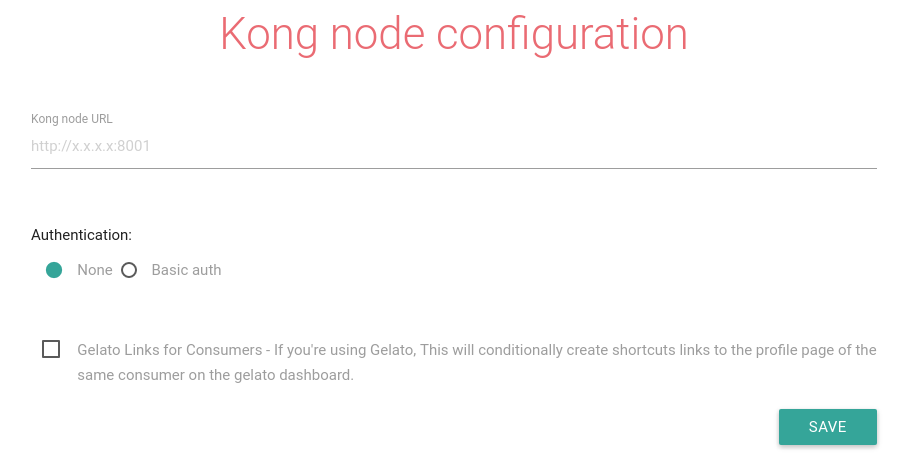
執行之後的畫面
2017-11-12 16-05-08 的螢幕擷圖.png
在 Kong node URL 輸入 Kong node 所在位置
例如   http://YOUR_KONG_IP:8001
點選 SAVE


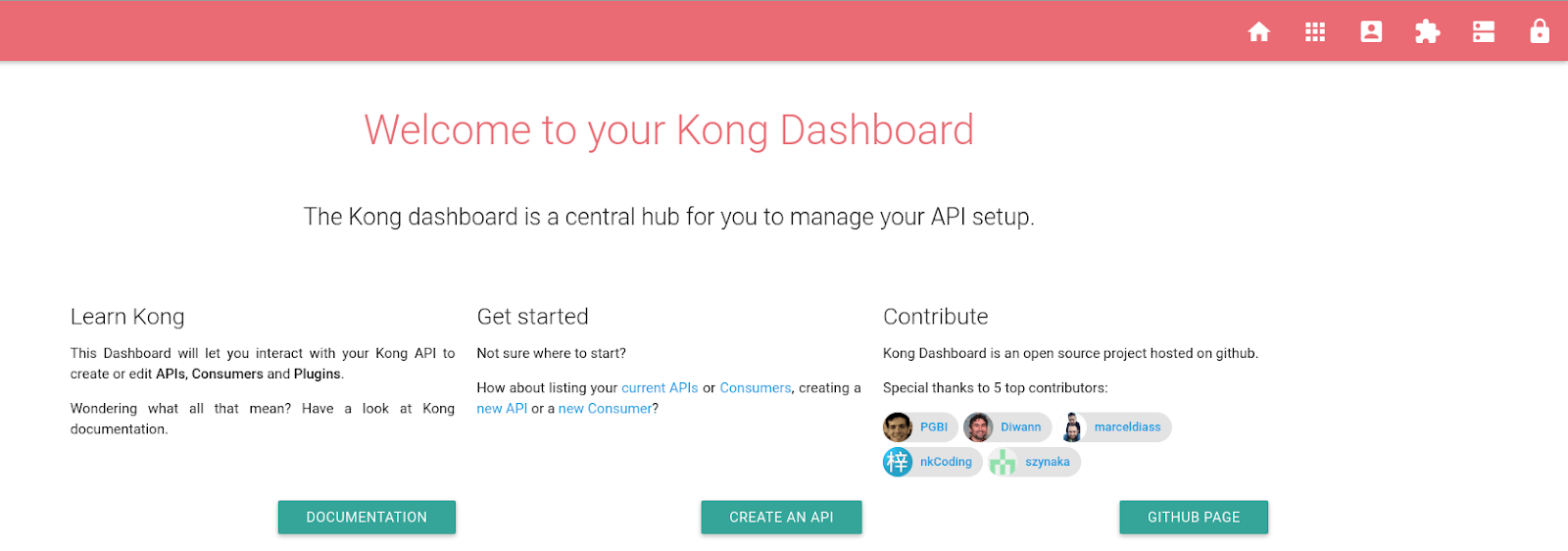
kong-dashboard 畫面
2017-11-12 16-07-56 的螢幕擷圖.png

接下來就可以針對 Plugins 來進行增加 Plugins, 或是新增 APIs

測試 新增 API

點選 Manage APIs
點選 ADD API

2017-11-12 16-15-02 的螢幕擷圖.png


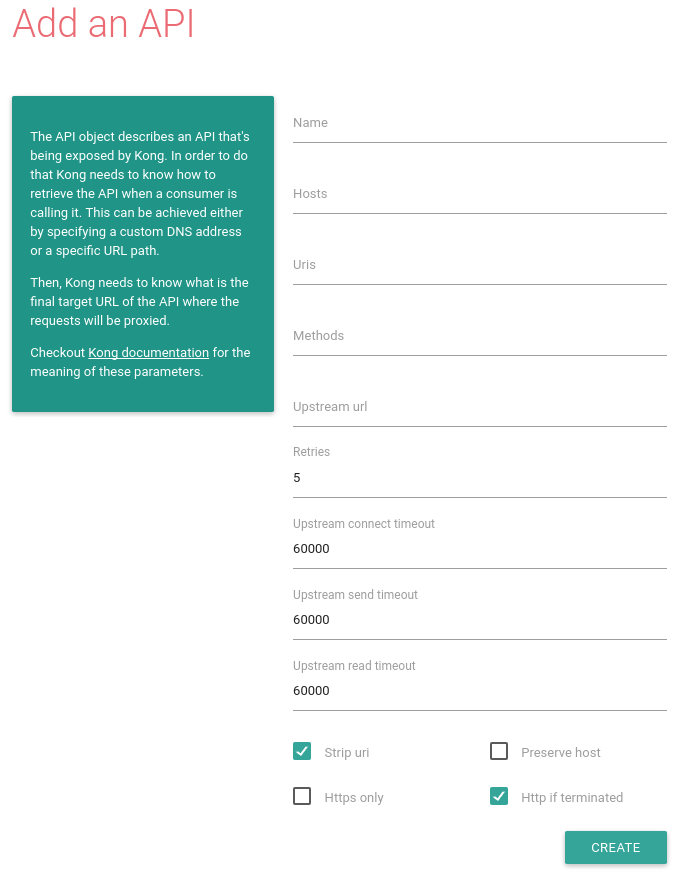
接下來進入設定畫面
2017-11-12 16-16-40 的螢幕擷圖.png
欄位說明
Name: 識別管理
Hosts: 真正提供服務的 FQDN
Uris: ( Host and Uris 至少要填一個 )( optional )
Methods: 限制 API 行為, GET or POST
Upstream url: API 根目錄路徑 例如 http://ipgod.nchc.org.tw/api/3/action
Strip uri: 如果勾選, 可以限制 uris 行為


原來的作法

> curl   http://ipgod.nchc.org.tw/api/3/action/tag_list
{"help": "http://ipgod.nchc.org.tw/api/3/action/help_show?name=tag_list", "success": true, "result": ["aqi", "eco", "GMP\u85e5\u5ee0", "OpenData", "Sensor", "test", "\u4f5c\u696d\u57fa\u91d1\u6703\u8a08\u5831\u8868", "\u5168\u90e8\u8cc7\u6599\u96c6", "\u5e38\u898b\u6feb\u7528\u7ba1\u5236\u85e5\u54c1", "\u6708\u5831", "\u672c\u7ad9\u6e05\u55ae", "\u6838\u51c6\u5291\u578b", "\u6feb\u7528\u7ba1\u5236\u85e5\u54c1", "\u74b0\u4fdd", "\u7a7a\u6c59", "\u7ba1\u5236\u85e5\u54c1", "\u85e5\u54c1\u88fd\u9020\u8a31\u53ef\u7de8\u865f", "\u98df\u54c1\u5b89\u5168", "\u98df\u54c1\u5b89\u5168\u7ba1\u5236\u7cfb\u7d71", "\u9910\u98f2\u696d", "\u9910\u98f2\u696d\u98df\u54c1\u5b89\u5168\u7ba1\u5236\u7cfb\u7d71"]}

這樣可讀性比較低, 使用之前裝的 underscore 來處理

> curl  http://ipgod.nchc.org.tw/api/3/action/tag_list  |  underscore  print
 % Total    % Received % Xferd  Average Speed   Time    Time     Time  Current
                                Dload  Upload   Total   Spent    Left  Speed
100   699  100   699    0     0   7141      0 --:--:-- --:--:-- --:--:--  7206
{
 "help": "http://ipgod.nchc.org.tw/api/3/action/help_show?name=tag_list",
 "success": true,
 "result": [
   "aqi",
   "eco",
   "GMP藥廠",
   "OpenData",
   "Sensor",
   "test",
   "作業基金會計報表",
   "全部資料集",
   "常見濫用管制藥品",
   "月報",
   "本站清單",
   "核准劑型",
   "濫用管制藥品",
   "環保",
   "空汙",
   "管制藥品",
   "藥品製造許可編號",
   "食品安全",
   "食品安全管制系統",
   "餐飲業",
   "餐飲業食品安全管制系統"
 ]
}


確認 kong API
http://YOUR_KONG_IP:8001/apis
http://YOUR_KONG_IP:8000

還沒建立 API 之前, 使用 kong 來呼叫 API

> curl  -i  -X  GET  http://YOUR_KONG_IP:8000/tag_list  -H   'Host: ipgod.nchc.org.tw'
HTTP/1.1 404 Not Found
Date: Sun, 12 Nov 2017 08:47:34 GMT
Content-Type: application/json; charset=utf-8
Transfer-Encoding: chunked
Connection: keep-alive
Server: kong/0.10.3

{"message":"no API found with those values"}

嘗試加入相關設定
加入 Name / Hosts / Upstream url
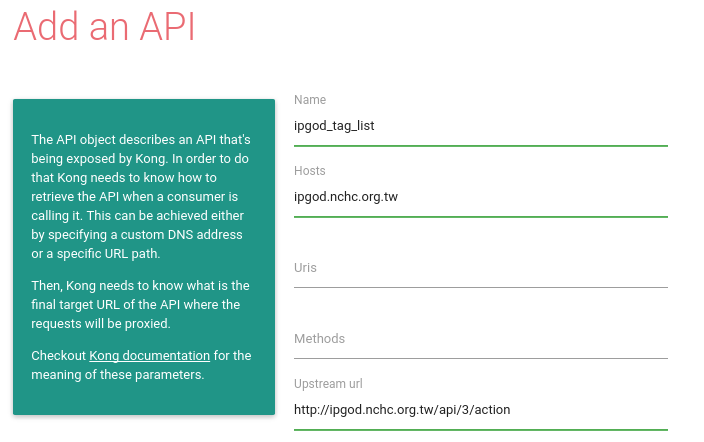
2017-11-12 16-58-22 的螢幕擷圖.png

確認 api 有被加進去


> curl   http://YOUR_KONG_IP:8001/apis  | underscore  print
 % Total    % Received % Xferd  Average Speed   Time    Time     Time  Current
                                Dload  Upload   Total   Spent    Left  Speed
100   397    0   397    0     0    346      0 --:--:--  0:00:01 --:--:--   346
{
 "data": [
   {
     "http_if_terminated": true,
     "id": "d54b1a02-d7ac-45d4-a01f-405e7c38052d",
     "upstream_read_timeout": 60000,
     "preserve_host": false,
     "created_at": 1510477097000,
     "upstream_connect_timeout": 60000,
     "upstream_url": "http://ipgod.nchc.org.tw/api/3/action",
     "strip_uri": true,
     "https_only": false,
     "name": "ipgod_tag_list",
     "retries": 5,
     "upstream_send_timeout": 60000,
     "hosts": ["ipgod.nchc.org.tw"]
   }
 ],
 "total": 1
}


再次測試

> curl  http://YOUR_KONG_IP:8000/tag_list  -H  'Host: ipgod.nchc.org.tw'  | underscore print
% Total    % Received % Xferd  Average Speed   Time    Time     Time  Current
                                Dload  Upload   Total   Spent    Left  Speed
100   699  100   699    0     0    485      0  0:00:01  0:00:01 --:--:--   484
{
 "help": "http://ipgod.nchc.org.tw/api/3/action/help_show?name=tag_list",
 "success": true,
 "result": [
   "aqi",
   "eco",
   "GMP藥廠",
   "OpenData",
   "Sensor",
   "test",
   "作業基金會計報表",
   "全部資料集",
   "常見濫用管制藥品",
   "月報",
   "本站清單",
   "核准劑型",
   "濫用管制藥品",
   "環保",
   "空汙",
   "管制藥品",
   "藥品製造許可編號",
   "食品安全",
   "食品安全管制系統",
   "餐飲業",
   "餐飲業食品安全管制系統"
 ]
}

  • -H : header
    • 對應 KONG API  內的Hosts 欄位
  • http://YOUR_KONG_IP:port
  • tag_list

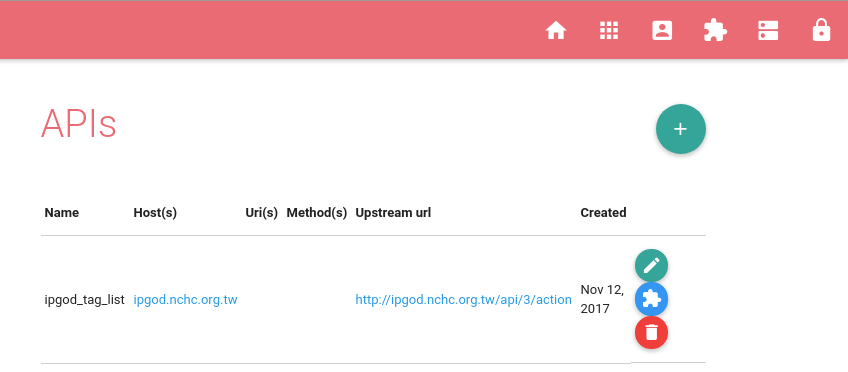
完成之後的畫面

2017-11-12 17-36-11 的螢幕擷圖.png


未來考慮


~ enjoy it

星期一, 11月 06, 2017

underscore-cli 測試小記

underscore-cli 測試小記

目前學習使用 api 方式來進行計劃使用

但是由於有的時候吐出來的訊息太難看
在 Thomas 建議之下, 想使用 underscore.js ( 官方網站 http://underscorejs.org/  )來處理

根據 Thomas 的說法是安裝 underscore-cli 來處理輸出

官方網站

他必須搭配  node.js 來使用

# zypper  search  nodejs

Loading repository data...
Reading installed packages...

S | Name             | Summary                                          | Type      
--+------------------+--------------------------------------------------+-----------
i | nodejs-common    | Common files for the NodeJS ecosystem            | package   
 | nodejs-common    | Common files for the NodeJS ecosystem            | srcpackage
 | nodejs-packaging | RPM Macros and Utilities for Node.js Packaging   | package   
i | nodejs4          | Evented I/O for V8 JavaScript                    | package   

看起來是有裝 nodejs 的, 所以繼續往下


首先先裝 npm, 之後透過 npm 來進行套件安裝
openSUSE 有 npm4 以及 npm6, 我是裝 npm4

# zypper  install  npm4


underscore-cli 安裝方式

# npm  install  -g  underscore-cli


看指令說明
# underscore  help


實際使用:

未使用 underscore-cli 之前

# curl   http://KONG_SERVER_IP:8001/apis
{"data":[{"methods":["GET"],"uris":["\/api\/3\/action\/package_list"],"id":"f5884e32-bcf4-48bc-9671-dffc79e510d9","hosts":["ipgod.nchc.org.tw"],"preserve_host":false,"created_at":1509519664000,"upstream_connect_timeout":60000,"upstream_url":"http:\/\/ipgod.nchc.org.tw\/api\/3\/action\/package_list","strip_uri":true,"name":"package_list","https_only":false,"http_if_terminated":true,"retries":5,"upstream_send_timeout":60000,"upstream_read_timeout":60000},{"methods":["GET"],"uris":["\/api\/3\/action\/package_show"],"id":"0572b498-b824-4758-9658-8c2b21ac8d6d","hosts":["ipgod.nchc.org.tw"],"preserve_host":false,"created_at":1509521573000,"upstream_connect_timeout":60000,"upstream_url":"http:\/\/ipgod.nchc.org.tw\/api\/3\/action\/package_show","strip_uri":true,"name":"package_data","https_only":false,"http_if_terminated":true,"retries":5,"upstream_send_timeout":60000,"upstream_read_timeout":60000}],"total":2}

使用 underscore-cli 處理

# curl   http://KONG_SERVER_IP/apis  |  underscore  print

 % Total    % Received % Xferd  Average Speed   Time    Time     Time  Current
                                Dload  Upload   Total   Spent    Left  Speed
100   917    0   917    0     0   369k      0 --:--:-- --:--:-- --:--:--  447k
{
 "data": [
   {
     "methods": ["GET"],
     "uris": ["/api/3/action/package_list"],
     "id": "f5884e32-bcf4-48bc-9671-dffc79e510d9",
     "hosts": ["ipgod.nchc.org.tw"],
     "preserve_host": false,
     "created_at": 1509519664000,
     "upstream_connect_timeout": 60000,
     "upstream_url": "http://ipgod.nchc.org.tw/api/3/action/package_list",
     "strip_uri": true,
     "name": "package_list",
     "https_only": false,
     "http_if_terminated": true,
     "retries": 5,
     "upstream_send_timeout": 60000,
     "upstream_read_timeout": 60000
   },
   {
     "methods": ["GET"],
     "uris": ["/api/3/action/package_show"],
     "id": "0572b498-b824-4758-9658-8c2b21ac8d6d",
     "hosts": ["ipgod.nchc.org.tw"],
     "preserve_host": false,
     "created_at": 1509521573000,
     "upstream_connect_timeout": 60000,
     "upstream_url": "http://ipgod.nchc.org.tw/api/3/action/package_show",
     "strip_uri": true,
     "name": "package_data",
     "https_only": false,
     "http_if_terminated": true,
     "retries": 5,
     "upstream_send_timeout": 60000,
     "upstream_read_timeout": 60000
   }
 ],
 "total": 2
}


這樣就比較適合人類閱讀了

~ enjoy it