Open Build Service 實作練習 Workshop 101
OS: openSUSE Leap 42.1
預先準備
首先設定 API 的 URL
# osc -A https://api.opensuse.org
Your user account / password are not configured yet.
You will be asked for them below, and they will be stored in
/root/.oscrc for future use.
Creating osc configuration file /root/.oscrc ...
Username: 輸入帳號
Password: 輸入密碼
建立完之後家目錄會產生 .oscrc 以及 .osc_cookiejar
使用 osc 指令進行 check out 專案 osc co home:使用者帳號
# osc co home:sakana
觀察目錄就會出現專案的資料夾
# ls
.bash_history .dbus inst-sys .oscrc .Xauthority bin .gnupg .local .rnd
.config home:sakana .osc_cookiejar .viminfo
切換到專案目錄
# cd home\:sakana/
使用 osc mkpac 指令建立 package, 這次workshop 使用的是 ctris
# osc mkpac ctris
A ctris
再次觀察
# ls
ctris gmchess Helloworld-test jUploadr .osc owncloud
進入 套件工作目錄
# cd ctris/
# vi ctris.spec
Name: ctris
Summary: Console based Tetris clone
URL: http://www.hackl.dhs.org/ctris/
License: GPL-2.0
Group: Amusements/Games/Action/Arcade
Version: 0.42
Release: 1
Source: %{name}-%{version}.tar.bz2
BuildRoot: %{_tmppath}/%{name}-%{version}-build
BuildRequires: ncurses-devel
Requires: ncurses
%description
An ASCII version of the well known game Tetris
%prep
%setup -q
%build
make
%install
%make_install
%debug_package
%clean
rm -rf $RPM_BUILD_ROOT;
%files
%defattr(-,root,root)
%doc AUTHORS COPYING README TODO
%doc %{_mandir}/man6/ctris.6.gz
/usr/games/ctris
%changelog
Notes
抓取套件 source code
# wget http://goo.gl/zWJXyd -O ctris-0.42.tar.bz2
觀察目錄
# ls
ctris-0.42.tar.bz2 ctris.spec .osc
觀察.osc 目錄
# ls .osc/
_apiurl _files _osclib_version _package _project
使用 osc vc 指令填寫 chang log
# osc vc
填入 change log
-------------------------------------------------------------------
Sat Sep 24 07:11:09 UTC 2016 -
- OBS workshop
# ls
ctris-0.42.tar.bz2 ctris.changes ctris.spec .osc
觀察目錄
# ls .osc/
_apiurl _files _osclib_version _package _project
標記要新增或是移除的檔案
# osc addremove
A ctris.spec
A ctris.changes
A ctris-0.42.tar.bz2
觀察目錄, 多了 _to_be_added
# ls .osc/
_apiurl _files _osclib_version _package _project _to_be_added
# cat .osc/_to_be_added
ctris.spec
ctris.changes
ctris-0.42.tar.bz2
到目前為止都是在 local
接下來進行 commit ( -ci ) 以及上傳到 build.opensuse.org
# osc ci -m "Ya! I am a packager"
Sending meta data...
Done.
Sending ctris
Sending ctris/ctris.spec
Sending ctris/ctris.changes
Sending ctris/ctris-0.42.tar.bz2
Transmitting file data ..
Committed revision 1.
觀察目錄
# ls .osc/
_apiurl ctris-0.42.tar.bz2 ctris.changes ctris.spec _files _meta _osclib_version _package _project
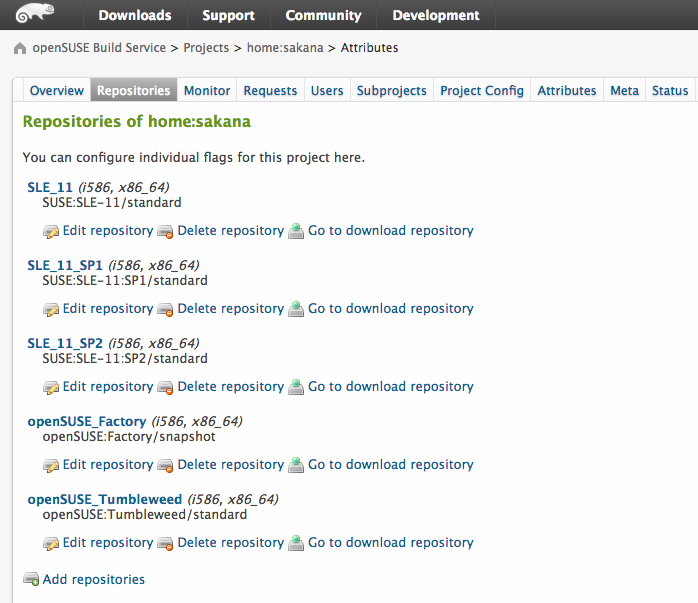
接下來要設定套件要編譯的 Repositories ( OS )
到 Web UI
點選 Repositories
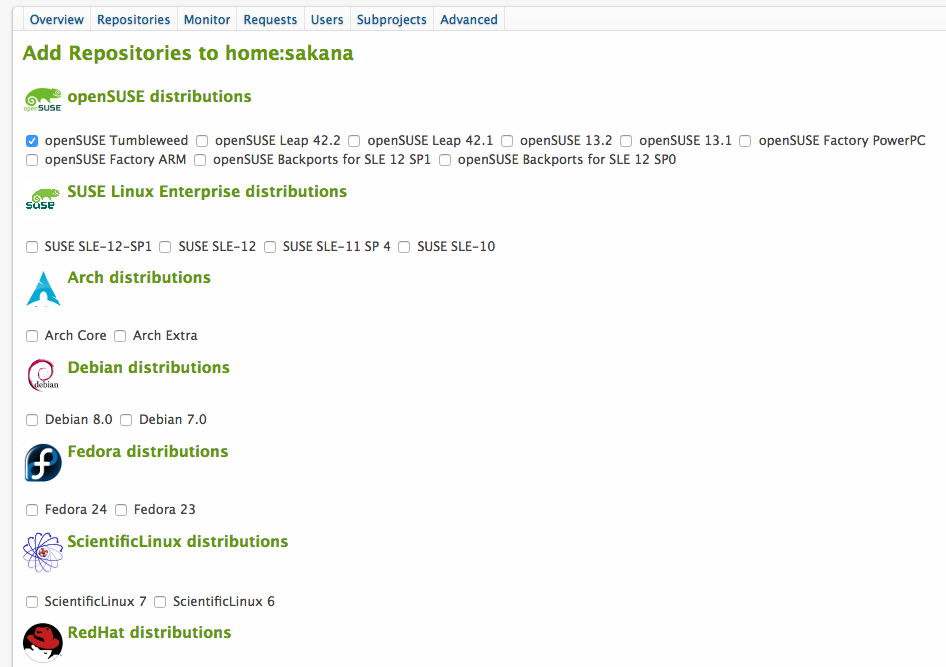
點選 Add repositories
針對要加入的 repo 勾選
勾選完之後就會自動 build
到此, 就可以在 OBS 上面享受用一個原始碼編譯出不同平台的便利性
剛剛是在 build.opensuse.org 上面編譯
那如果要在本機編譯呢?
本地端 編譯 ( 要配合自己有裝的 repo )
可以使用 osc build 指令 後面加上 repo 以及架構 還有 .spec 檔案
# osc build openSUSE_Leap_42.1 x86_64 ctris.spec
Building ctris.spec for openSUSE_Leap_42.1/x86_64
Getting buildinfo from server and store to /root/home:sakana/ctris/.osc/_buildinfo-openSUSE_Leap_42.1-x86_64.xml
Getting buildconfig from server and store to /root/home:sakana/ctris/.osc/_buildconfig-openSUSE_Leap_42.1-x86_64
Updating cache of required packages
The build root needs packages from project 'openSUSE:Leap:42.1'.
Note that malicious packages can compromise the build result or even your system.
Would you like to ...
0 - quit (default)
1 - always trust packages from 'openSUSE:Leap:42.1'
2 - trust packages just this time
? 1
adding 'openSUSE:Leap:42.1' to ~/.oscrc: ['https://api.opensuse.org']['trusted_prj']
100.0% cache miss. 0/100 dependencies cached.
[ 34s] RPMLINT report:
[ 34s] ===============
[ 35s] ctris.x86_64: W: incorrect-fsf-address /usr/share/doc/packages/ctris/COPYING
[ 35s] The Free Software Foundation address in this file seems to be outdated or
[ 35s] misspelled. Ask upstream to update the address, or if this is a license file,
[ 35s] possibly the entire file with a new copy available from the FSF.
[ 35s]
[ 35s] ctris.x86_64: W: file-contains-current-date /usr/games/ctris
[ 35s] Your file contains the current date, this may cause the package to rebuild in
[ 35s] excess.
[ 35s]
[ 35s] 2 packages and 0 specfiles checked; 0 errors, 2 warnings.
[ 35s]
[ 35s]
[ 35s] template finished "build ctris.spec" at Sat Sep 24 07:38:00 UTC 2016.
[ 35s]
/var/tmp/build-root/openSUSE_Leap_42.1-x86_64/home/abuild/rpmbuild/SRPMS/ctris-0.42-1.src.rpm
/var/tmp/build-root/openSUSE_Leap_42.1-x86_64/home/abuild/rpmbuild/RPMS/x86_64/ctris-0.42-1.x86_64.rpm
/var/tmp/build-root/openSUSE_Leap_42.1-x86_64/home/abuild/rpmbuild/RPMS/x86_64/ctris-debuginfo-0.42-1.x86_64.rpm
這邊會看到, 編譯完成之後會放到 /var/tmp 下面的目錄
Lab: 共同協作
那如果想要跟其他人共同維護套件呢?
範例 使用現有的套件
使用 osc branch 指令建立分支, 這邊是使用講師的 套件
# osc branch home:gary_lin ctris
# cd
切換到工作目錄
# osc co home:sakana:branches:home:gary_lin/ctris
A home:sakana:branches:home:gary_lin
A home:sakana:branches:home:gary_lin/ctris
A home:sakana:branches:home:gary_lin/ctris/ctris-0.42.tar.bz2
A home:sakana:branches:home:gary_lin/ctris/ctris.changes
A home:sakana:branches:home:gary_lin/ctris/ctris.spec
At revision e1fa18eaa16d59e32af37e7b02af3130.
觀察目錄
# ls
.bash_history bin .config .dbus .gnupg home:sakana home:sakana:branches:home:gary_lin inst-sys .local .osc_cookiejar .oscrc .rnd .viminfo
由於只是 workshop 所以先切換到該套件的工作目錄
# cd home\:sakana\:branches\:home\:gary_lin/ctris/
測試改動 .spec 內容 ( 這邊我改了 release 版本 )
# vim ctris.spec
填入 change log
# osc vc
標記新增或是移除檔案
# osc addremove
進行 build 動作
$ osc build openSUSE_Leap_42.1 x86_64
進行 commit, 此時都是在自己的 home project 上面
$ osc ci -m “another change”
可以到 Subprojects 查詢
透過 osc submitreq 送出更動請求 ( 像是git 的 pull request )
# osc submitreq
created request id 429914
這樣就可以完成 協同工作
今天的 workshop 真是收穫良多
謝謝 Gary
~ enjoy it